%20(900%20x%20210%20mm)%20(1).png)
What is the best apprenticeship management software for UK training providers?
Patchwork spreadsheets, scattered systems, and data re-entries invite errors and cost hours, making apprenticeship delivery harder than it needs to be. Choosing the right apprenticeship management software can help UK training providers centralise workflows, improve learner engagement, and make more informed decisions.
But how do you compare the options and choose a system that works for your organisation?
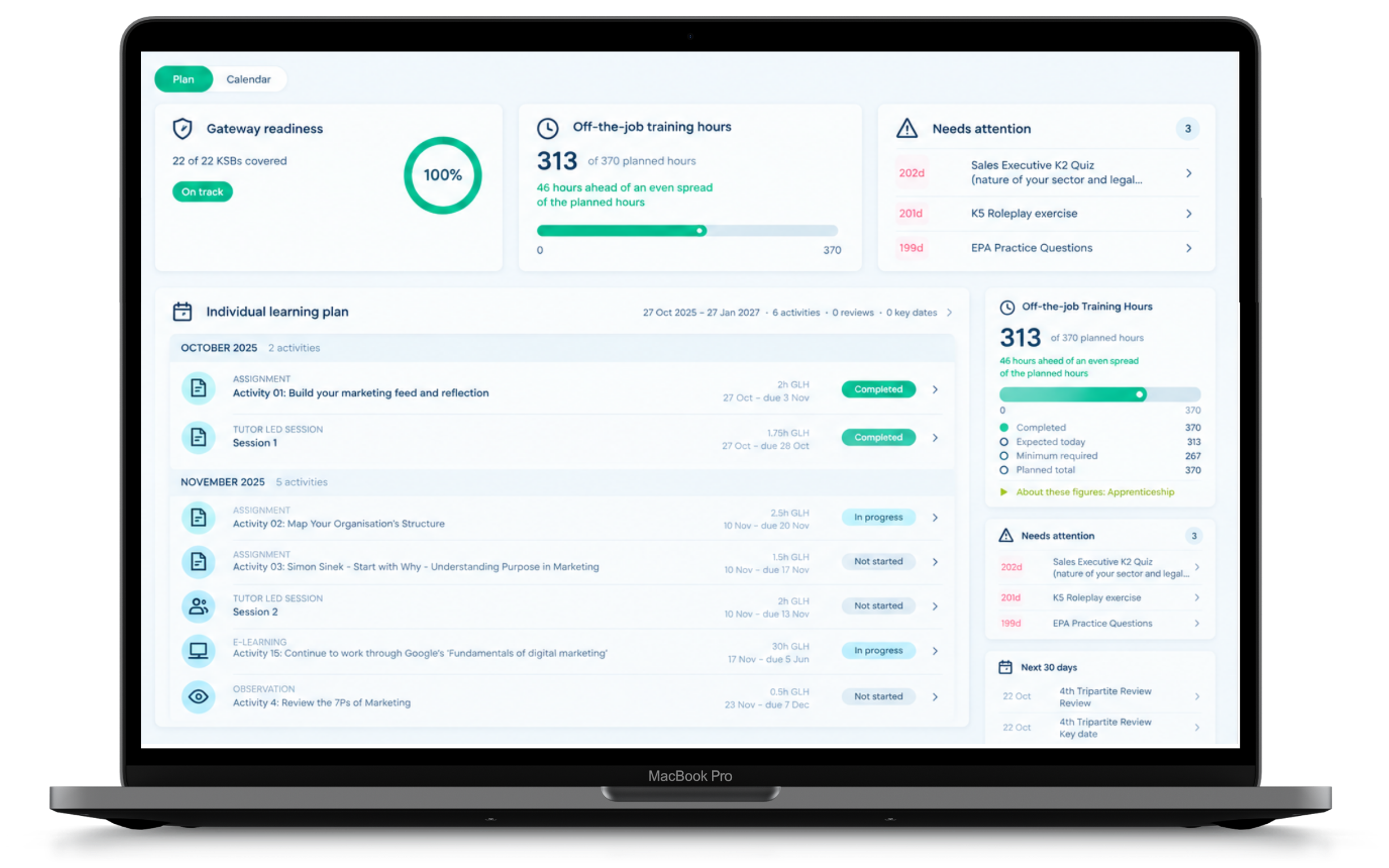
The best apprenticeship management software should support the whole delivery journey: applications and onboarding, initial assessment, individualised learning, progress monitoring, and achievement. It should also help providers maintain the records and oversight needed for funding compliance, quality assurance, and inspection readiness.
That means looking beyond a traditional learning management system (LMS) or ePortfolio. Consider how your people, processes, and information connect, and whether the system helps learners, employers, tutors, and managers act on what they know.
This guide explains the capabilities worth looking for, outlines established UK platforms, and offers practical questions to ask when comparing suppliers.
What should apprenticeship management software do?
An effective platform should support five interconnected areas of apprenticeship delivery.
1. Applications and onboarding
When enquiries and applications are spread across inboxes, staff can lose time chasing updates and entering the same information repeatedly.
A good apprenticeship management platform should help providers:
Capture and manage applications in one place
Track applicants through clearly defined stages
Communicate effectively with applicants and employers
Reduce duplicate data entry and repetitive administration
Support an organised transition into the next stage of the learner journey
A structured application process helps teams see where each applicant stands and what needs to happen next, while giving prospective apprentices a clearer experience.
2. Initial assessment and recognition of prior learning
Before an apprenticeship begins, providers need to understand what an individual already knows and can do.
Initial assessment should establish the individual’s starting point, identify relevant recognised prior learning, and document how that evidence informs the training they need.
Look for software that enables providers to:
Assess knowledge, skills, and behaviours against the apprenticeship standard
Record and verify evidence of prior learning
Identify where planned learning activities may need to be adjusted or removed
Record the rationale for decisions
Produce a clear, auditable record of the assessment and its impact on the training plan
The practical value is an individualised training plan: providers can make informed and evideced decisions when adjusting activities or hours where relevant prior learning is evidenced, and ensure that they secure the funding the learner actually needs.
3. Learning delivery and progress tracking
Once an apprentice starts on programme, the focus shifts to delivering learning, monitoring progress, and providing effective support.
Providers should look for a platform that includes:
Individual Learning Plans (ILPs)
Structured learning activities and resources
ePortfolio and evidence submission
Knowledge, skills and behaviours (KSB) tracking
Off-the-job training records
Progress reviews and feedback
Dashboards highlighting outstanding actions and learners requiring support
For example, a clear Individual Learning Plan can show an apprentice where they are in their learning journey at every stage, while dashboards help tutors spot overdue work or gaps in progress before they become bigger problems.
4. Employer engagement
Employers play an essential role in successful apprenticeship delivery.
The right software should make it easy for employers to understand their apprentices' progress, contribute to reviews, and support workplace learning without relying on a constant exchange of emails and spreadsheets.
Giving employers access to relevant progress and review information can help them contribute at the right time and connect off-the-job learning with what apprentices do at work.
5. Funding compliance and management information
Apprenticeship providers need reliable records to support funding compliance, quality assurance, and informed decisions about their provision.
A platform should support accurate learner and funding records, accessible audit evidence, and useful management reporting.
Managers should be able to identify trends and risks, understand where support is needed, and follow up on actions taken.
For Ofsted inspection readiness, the value is not simply in storing evidence. Providers need to understand and explain how they plan learning, assess starting points, monitor progress, identify concerns, and improve the learner experience. A comprehensive system can assist and exemplify those processes.
The aim is to turn reliable information into decisions and improvements, not just accumulate records.
Which apprenticeship management platforms are available in the UK?
There are several established software providers supporting apprenticeship delivery in the UK, including Rubitek, Aptem, Bud, OneFile and OneAdvanced, whose portfolio includes PICS and Smart Assessor.
They have overlapping features, but differ in the way they package application management, initial assessment, ePortfolio, funding administration, reporting, and delivery tools. The right fit depends on which capabilities your organisation needs and how they work together.
Rubitek: Connected apprenticeship management
Rubitek offers three specialist platforms aligned to key stages of delivery: Apply for applications, Assess for recognition of prior learning, and Progress for ongoing apprenticeship management. These products are designed to connect the journey from application to achievement.
Rubitek Apply: manage applications and applicant progression.
Rubitek Assess: establish starting points and document prior learning decisions.
Rubitek Progress: plan learning, track progress, and engage apprentices and employers.
Built on first-hand experience of apprenticeship delivery, Rubitek combines purpose-built software with practical sector knowledge and customer support.
Aptem: Configurable end-to-end apprenticeship management
Aptem positions itself as an end-to-end apprenticeship management platform covering recruitment, enrolment, assessment, programme delivery, and reporting.
Providers considering Aptem may wish to examine configuration requirements, workflow tools, and
integrations in a demonstration, alongside the day-to-day experience for their teams.
Bud: Integrated learning, funding and compliance
Bud presents an integrated approach to enrolment, programme design, delivery, learner management, funding and reporting.
Providers could ask Bud to demonstrate how programme information is used by tutors, managers, and employers across the learner journey.
OneFile: ePortfolio and learner management
OneFile is known for its ePortfolio offering and also provides wider tools associated with enrolment, learner management and apprenticeship delivery.
When evaluating OneFile, check which functions sit in which products and how information moves between them.
PICS and Smart Assessor - (OneAdvanced)
PICS and Smart Assessor are separate products within the OneAdvanced education portfolio.
PICS is associated with learner administration, funding data, ILR processing, and management reporting.
Smart Assessor is associated with ePortfolio, assessment, evidence, and apprentice progress.
Providers can explore how these tools and other OneAdvanced products work together, including what integrations or licences may be required.
How do these apprenticeship platforms compare?
Use this overview to shortlist suppliers, not as a substitute for a product demonstration. Ask each supplier to show the same real-world tasks so that you can compare how the workflows operate in practice.
Platform | Investigate |
Rubitek | Connected applications, prior learning assessment, and apprenticeship delivery through Apply, Assess, and Progress |
Aptem | End-to-end programme management, configuration, and workflows |
Bud | Integrated enrolment, learning delivery, and management information |
OneFile | ePortfolio and associated learner management tools |
PICS | Learner administration, ILR, and funding information |
Smart Assessor | ePortfolio, evidence, assessment, and progress |
These are high-level descriptions rather than a verified feature-by-feature comparison. Availability, integrations, packaging, and pricing can change; confirm specific requirements directly with each supplier before making a purchasing decision.
Rather than counting features, ask which platform makes your team's everyday work simpler and gives learners, employers, and managers the information they need.
How does Rubitek support the apprenticeship journey?
Rubitek's three platforms - Apply, Assess and Progress - are designed for the points where providers often need to transfer information or make an important decision: receiving applications, assessing starting points and managing learning.
This connected approach aims to reduce repeated entry and preserve the context behind decisions as a person moves from applicant to apprentice.
Step 1: Rubitek Apply - Start with a better application experience
Prospective apprentices need to understand where their application stands and what happens next.
Rubitek Apply provides a structured way for training providers to receive applications, manage applicant information, monitor progress, and maintain communication throughout the application process.
A central application pipeline helps admissions teams see outstanding actions instead of piecing together updates from multiple records.
For a training provider, this can mean fewer handovers to chase and more consistent communication with applicants and employers.
The benefit: clearer applicant status, more consistent communication, and less manual administration.
Step 2: Rubitek Assess - Recognise prior learning with confidence
Two apprentices on the same standard may have very different starting points.
Rubitek Assess helps providers review evidence of knowledge, skills, and behaviours, establish an applicant's starting point, and consider the implications for planned training.
It supports decisions against the apprenticeship standard and a review of the planned learning activities that follow from the assessment.
Where prior learning is recognised, providers can document whether learning activities and associated hours should be retained, adjusted, or removed, including the rationale.
The result is a traceable link between the assessment and the individual's training plan.
The benefit: defensible, evidence-led decisions about prior learning and a clearer basis for individualising training.
Step 3: Rubitek Progress - Keep learning and achievement on track
Once training begins, providers need to see what was planned, what has happened, and where action is required.
Rubitek Progress brings learning plans, activities, evidence, reviews, and progress information into the day-to-day delivery workflow for learners, tutors, employers, and provider teams.
For example, learners can see planned activities while tutors and managers use progress information to identify outstanding actions and support needs.
This helps teams spend less time searching for information and more time following up with apprentices who need support.
The benefit: clearer priorities for tutors and learners, and more timely intervention.
Why does connecting applications, assessment, and progress matter?
A common source of administration is the handover between admissions, initial assessment, and programme delivery.
An application contains information about the individual
Initial assessment adds evidence about their starting point
The training plan uses that context to set out what they need to learn
If these stages sit in disconnected systems, staff may lose time repeating processes or struggle to trace why a particular decision was made. Connecting these stages helps information and decisions follow the apprentice, rather than being recreated at each handover.
For providers, that can mean a clearer audit trail and fewer duplicated tasks. For apprentices, it means a more coherent transition into learning.
How should you choose apprenticeship management software?
Use the same questions for each supplier and ask for demonstrations using scenarios from your own provision:
Does it support our delivery model? Consider the programmes you deliver, your organisation's size, and how your teams work.
Can it improve efficiency? Identify which processes currently create the most administration and ask suppliers to demonstrate how their software addresses them.
Does it support compliance? Check how the system handles learner records, initial assessment, training plans, funding information, and audit evidence.
Will learners and employers find it easy to use? A platform is only effective when people can use it confidently.
Can we access useful management information? Look for practical reporting and visibility; not simply large volumes of data.
What support will we receive? Consider implementation, training, ongoing customer service, and how the supplier responds to feedback.
Does it offer good long-term value? Evaluate the total cost of ownership, including licences, implementation, support, and the time your team could save.
For example, ask how a recognised prior learning decision changes the training plan, how a tutor spots an overdue activity, or how a manager retrieves the evidence behind a decision.
Frequently asked questions about apprenticeship management software
What is the difference between an LMS, an ePortfolio and apprenticeship management software?
An LMS typically focuses on delivering learning content. An ePortfolio supports recording evidence, feedback and assessment. Apprenticeship management software may also cover applications, training plans, funding information, reviews, reporting and employer involvement. The boundaries vary by supplier.
Can one platform handle applications, prior learning and programme delivery?
Some products cover these stages within one system or connected product suite. Ask suppliers to demonstrate the actual handovers, permissions and data flow rather than relying on the phrase “end-to-end”.
What should training providers ask about Ofsted readiness?
Ask whether managers can access meaningful information about curriculum planning, starting points, progress, support and quality improvement - and whether the records are usable in normal management activity, not just during inspection.
So, what is the best apprenticeship management software?
There is no universally best apprenticeship management platform: the right choice depends on the organisation's delivery model, existing systems and operational priorities.
Providers who want to connect applications, initial assessment and delivery should consider whether Rubitek's specialist approach addresses their biggest sources of duplication, delay, or uncertainty.
The next step is to test that fit against the real tasks your learners, employers, tutors and administrators carry out.
Discover how Rubitek could support your organisation
If you're reviewing software or trying to connect parts of your apprenticeship delivery process, we can demonstrate how Apply, Assess, and Progress support your specific workflows.
Bring us a scenario – from applicant onboarding to a prior learning decision or an overdue activity – and we'll show you how it could work in Rubitek.


Comments